
The macOS file manager built for developers
Iruka is a fast, native macOS file manager inspired by KDE's Dolphin — with a terminal that follows your folder, dual pane browsing, one-click SSH & SCP, git integration, beautiful Markdown and code previews, in-place editing, and Power Search with grep & regex. The cleaner, faster alternative to Path Finder and ForkLift.
brew install --cask dorienh/iruka/iruka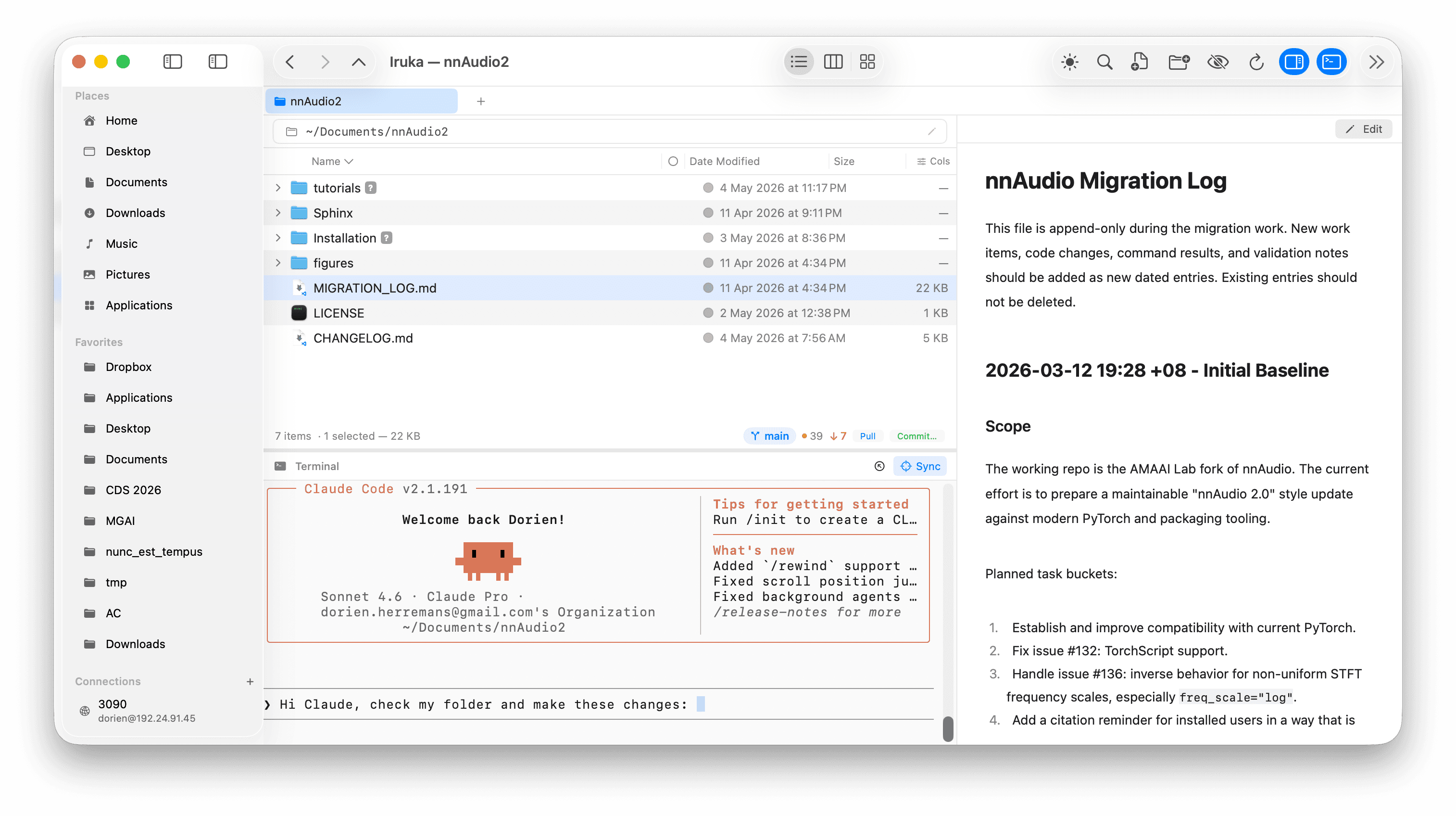
Demo
Watch Iruka in action
A synced terminal that follows your navigation, one-click SSH, and rich previews — see it work on a real Finder replacement for Mac.
Power features
Everything Finder forgot, done right
Iruka brings the speed and depth of a Linux file manager to a polished, native macOS experience.
Navigate in the UI. Your terminal follows.
Browse to any folder and the integrated terminal is already there — no cd needed. The path bar gives you instant folder navigation with autocomplete, and the shell tracks every move you make in the UI. Click around, then type. Zero friction.
One click to connect. Drag to transfer.
Save your remote servers once and connect instantly from the sidebar — no typing IPs or remembering usernames. Need to move files? Right-click any file and send it to a remote host via SCP, with a UI that guides you through it. Remote work, made simple.
Beautiful previews for every file type
Select any file and see an instant preview — Markdown rendered beautifully, code with full syntax highlighting across 60+ languages, PDFs, images, and more. The preview pane stays open as you navigate, making it the fastest way to scan a codebase or review changes.
See exactly what changed, before you commit
Full git controls without leaving the file browser — stage, commit, pull, and push. The diff review panel shows every change file by file, so you never commit blind. Compare any two files or folders side by side, or hand off to FileMerge and other external merge tools in one click.
Search with grep, regex, and filters
Power Search goes far beyond filename matching. Search file contents with grep, write regex patterns, filter by type, extension, or date, and see results instantly — no indexing required. Find any file or line of code in seconds.
Dual pane browser
Open two folders side by side and drag files between them. Perfect for comparing directories, reorganising projects, or moving files without losing your place.
Git integration
See branch status and staged files at a glance. Commit, pull, push, and sync with one click — right from the folder you're in, without touching the terminal.
Batch rename
Rename dozens of files at once with pattern-based rules. Preview every change before applying — no mistakes, no undo needed.
Drop stack
Park files on a shelf, navigate anywhere — another folder, tab, or window — then Copy Here or Move Here to send the whole pile where you actually wanted it. Parking is instant and never touches a file; both actions are undoable with ⌘Z.
Operations queue
Copy, move, and delete operations run in a live queue with real-time progress. Large transfers never block you from continuing to work.
List, column & icon views
Switch between list, column browser, and icon view to match how you think about your files. Each view remembers your preferences per folder.
Edit files without leaving
Click Edit on any text or code file to make changes right in the preview pane. Not a full editor — just the fastest way to fix a typo, tweak a config, or patch a line of code without app-switching.
Cloud mounts
Mount S3 buckets, SFTP servers, and WebDAV shares as folders and browse them just like local storage.
Symlink support
Full support for symbolic links — navigate into them, see where they point, and create new ones without dropping to the terminal.
SSH that follows your mount
Browse an SFTP mount and open a real SSH session with one click — it lands in the folder you're viewing and stays in sync as you navigate, running commands natively on the server instead of over the mount.
Root-enabled SFTP mounts
Turn on Mount as root to read and write anywhere on the server — copies, moves, renames and deletes run with full permissions, not just what your account can reach.
Adjustable text size
Scale the terminal font and the app's interface text to fit your eyes and your setup, from Settings → Appearance.
Gallery
A closer look
Click any image to enlarge · Scroll to explore →
Why Iruka?
Simple. Powerful. Fast.
Finder is fine for casual use, but it hits walls fast. Path Finder and ForkLift add features, yet they each specialise in one thing and leave gaps everywhere else. Iruka takes the best ideas from KDE's Dolphin and rebuilds them natively for macOS — clean enough to get out of the way, deep enough to handle everything you throw at it.
No subscription. No bloat. Just a file explorer that keeps up with the way you actually work.
| Feature | Iruka | Finder | Path Finder | ForkLift |
|---|---|---|---|---|
| Dual pane browser | ||||
| Integrated terminal | ||||
| Terminal synced to navigation | ||||
| SSH & SCP transfers | Limited | |||
| Git status, commit & push | Limited | |||
| Markdown preview | Limited | Limited | Limited | |
| CSV rendered as a grid | ||||
| Code with syntax highlighting | ||||
| In-place text & code editing | ||||
| Power Search (grep + regex) | Limited | Limited | ||
| Batch rename | Limited | |||
| Operations queue | Limited | |||
| Cloud mounts (S3, SFTP, WebDAV) | Limited | |||
| Native & lightweight | Limited |
Pricing
Simple, one-time pricing
Pay once, own it forever. Updates included for a year — renew only if you want more.
Introductory pricing — will increase as the app grows. Your purchase locks in today's price.
Want 3 years of updates included?
Update renewals (after year 1 or 3): $9.99 Personal · $19.99 Team / year
Roadmap & Community
We listen and adapt to you
Iruka grows with its community. Every release is shaped by real feedback from people who use it daily — your feature requests directly influence what gets built next.
Post in Discussions — we read every request and the most-upvoted ideas make it into the next release.
Request a featureSynced terminal, SSH integration & Markdown preview
ShippedTerminal that follows your navigation, one-click SSH connections, and beautiful Markdown rendering.
Git control, Power Search & syntax-highlighted previews
ShippedBranch status, commit & push from the UI, grep-powered search, and code previews with syntax highlighting.
Dual pane, in-place editing & cloud mounts
ShippedSide-by-side dual pane browser, edit text and code files in place, and browse S3 / SFTP / WebDAV like local folders.
Batch rename, operations queue & symlink support
ShippedRename many files at once, track copy/move progress in a live queue, and full support for symlinks.
Continuously growing with the community
OngoingEvery release adds features driven by user requests. Tell us what you need — we ship quickly.
Ambassador Program
Love Iruka? Help us spread the word.
We're looking for terminal power users who believe in better file management. Share Iruka with your audience — write a post, make a video, mention it in your newsletter, or just tell your dev team — and we'll give you free lifetime access in return.
No follower minimums. No contracts. Just genuine passion for great tools.
Apply via GitHub DiscussionsFree lifetime access — all future releases included
Early access to features before public release
Direct line to the dev team — your voice shapes the roadmap
Be part of a small community building something great
FAQ
Common questions
- Is Iruka a replacement for macOS Finder?
- Yes — Iruka is a full Finder replacement. It adds what Finder lacks: a terminal that follows your current folder, SSH connections, git status in the file browser, regex-powered Power Search, and rich previews (Markdown, code, images). Most users switch completely within a week.
- How does Iruka compare to Path Finder?
- Both are Finder alternatives, but they take different approaches. Path Finder focuses on dual-pane browsing and advanced sorting. Iruka focuses on terminal-UI sync — navigate in Iruka and your terminal is already in that folder, ready to type. Iruka also adds SSH / SCP, git integration, in-app Markdown and code previews, and in-place text editing at a lower price.
- How does Iruka compare to ForkLift?
- ForkLift is primarily a file transfer client. Iruka is a daily file manager — where you browse, preview, edit, and organise files. Both support SSH / SFTP, but Iruka adds a synced terminal, git control, grep / regex search, and rich previews that ForkLift does not.
- Does Iruka have a built-in terminal?
- Yes. Iruka includes a synced terminal panel that always reflects the folder you are browsing. Navigate to a folder in the UI and the terminal is already there — no cd commands needed. You can run git commands, launch Claude Code, or use any CLI tool without losing your place.
- Does Iruka support SSH and remote servers?
- Yes. Iruka has one-click SSH connections with saved hosts — you will never forget an IP address again. You can also right-click any file to SCP it to a remote server, making remote file management as easy as local browsing.
- Can I get an SSH terminal while browsing an SFTP mount?
- Yes. While browsing a mounted server, press the network button in the terminal header to open a real SSH session that lands in the folder you're viewing and stays in sync as you navigate — commands then run natively on the server instead of over the mount, which is faster and immune to a stalled mount hanging the shell.
- Can an SFTP mount write with root/sudo permissions?
- Yes. Edit Connection has a Mount as root switch that runs the server's SFTP service under sudo, so the volume can read and write anywhere on the machine instead of only where your account has access. It's off by default and requires a one-line sudoers change on the server — see the docs for setup.
- What macOS version does Iruka require?
- Iruka requires macOS 14 (Sonoma) or later. It is a Universal binary that runs natively on both Apple Silicon (M1, M2, M3, M4) and Intel Macs.
- Where do I find my license key?
- After purchase, LemonSqueezy sends you an email titled "Your Iruka Personal (X year updates) receipt" — your license key is in that email. Open Iruka, go to Settings → License, and paste it there to activate.
- Is there a free trial?
- Yes — a 30-day free trial is included with no credit card required. Download the DMG, install it, and use the full app for 30 days before deciding whether to buy.
- How much does Iruka cost?
- Iruka is $19.99 for Personal (up to 3 Macs) and $39.99 for Team (up to 10 Macs). These are one-time payments that include one year of updates. Current pricing is introductory — prices will increase as the app grows, but your purchase locks in today's price forever.
- Is Iruka a subscription?
- No. Iruka is a one-time purchase — you pay once and own it forever. One year of updates is included (three years on the extended option). After that you can renew updates for $9.99/year for Personal or $19.99/year for Team, or keep using the version you have indefinitely. Renewing early never costs you anything: whatever time is left on your current period is added to the new one. There is no recurring charge.
- Does Iruka work on Intel Macs?
- Yes. Iruka is a Universal binary and runs natively on both Apple Silicon (M1, M2, M3, M4) and Intel Macs. It requires macOS 14 (Sonoma) or later.
- What is better than ForkLift for Mac?
- If you need a daily file manager rather than just a file transfer client, Iruka is the stronger choice. ForkLift excels at SFTP transfers but lacks a synced terminal, git integration, and in-app file previews. Iruka covers all of that plus Power Search with grep and regex support.
- Is there a ForkLift alternative that also replaces Finder?
- Yes — Iruka is built to replace both. ForkLift is a transfer client, not a daily driver, and Finder lacks a terminal, git, and real previews. Iruka combines ForkLift-level SSH/SFTP support with a full Finder replacement: dual-pane browsing, a synced terminal, git integration, and rich previews in one app.
- Is there a Dolphin file manager for Mac?
- Not officially — KDE's Dolphin is Linux-only. Iruka is the closest thing to Dolphin for Mac: it brings Dolphin's signature feature, a terminal that follows your navigation as you browse, natively to macOS, alongside git integration, Power Search, and rich previews Dolphin doesn't have.
- Is there a Mac file manager with git integration?
- Yes — Iruka shows git branch status and staged/unstaged changes directly in the file browser. You can commit, pull, and push without leaving the app or opening a separate git client.
- Can a Mac file manager open a terminal in the current folder?
- Yes. This is one of Iruka's core features: its built-in terminal panel always reflects the folder you are browsing. Navigate to a folder and the terminal is already there — no cd command needed. It works exactly like KDE's Dolphin on Linux, built natively for macOS.
- Is there a free Mac file manager?
- Iruka includes a 30-day free trial with no credit card required — you get the full app for a month before deciding. After the trial, it is $19.99 for Personal or $39.99 for Team, both one-time payments.
Switch to a faster way to manage files
Download Iruka and feel the difference in the first five minutes. 30-day free trial — no subscription required.
Auto-updates powered by Sparkle
brew install --cask dorienh/iruka/iruka